Jetpac review
The last time I paid for carrier roaming was a four-day trip to Germany. €62 for data; I rationed so carefully that I barely loaded a video the entire trip. Three weeks after I got home, the bill arrived, and I sat with it for longer than I'd like to admit. That experience sent me looking seriously at travel eSIMs, and eventually to Jetpac.
Most providers in this space are near-identical. You pick a destination, buy a data pack, scan a QR code, and hope it connects when you land. The real differences between Airalo, Holafly, and the rest come down to pricing and country lists.
Jetpac does something none of them do: it accounts for the part of travel that has nothing to do with data. Your flight is delayed. The gate area is packed. You have three hours and nowhere to go. That's where SmartDelay comes in. Free airport lounge access, triggered automatically when your flight hits a 60-minute delay.
Jetpac: Plans and pricing
Jetpac sells three types of data packs: single-country, regional, and global. All are one-time purchases. No subscription is required. Plans activate automatically when you arrive at your destination.
Plan Type | Starting Price | Coverage | Data | Validity | Hotspot |
Single-Country (e.g., Japan) | From $10 | 1 country | 5GB-40GB+ | 4-30 days | Yes (unlimited) |
Regional (e.g., Europe) | From $22 (on sale) | 32-43 countries | 10GB-40GB | 30 days | Yes (unlimited) |
Global | From $69.99 | 96 countries | 30GB-50GB | 30-365 days | Yes (unlimited) |
Unlimited (select markets) | From $65.99 | Select countries | Unlimited* | 30 days | Yes (unlimited) |
*Unlimited plans run at full speed for the first 3GB in any 24-hour period, then throttle to 1Mbps for the remainder of the day.
New user offer: Your first pack can be 1GB for $1, valid for 4 days. It is a real trial. Buy it before a trip, test connectivity on your specific route, then upgrade to a larger pack once you know it works for you.
Single country plans
Prices vary by destination. In Japan, as a benchmark, 5GB costs $10, 10GB costs $20, and 30GB costs around $30 with current promotions. The US plan costs $15.99 for 10GB over 30 days and is available via AT&T, Verizon, and T-Mobile. These are fair prices for a destination-specific pack.
Single-country plans work well for focused trips. They activate upon arrival, and the clock starts only once you connect.
Regional plans
Regional packs are the sweet spot for multi-country travel. The Europe plan covers 32 to 43 countries, depending on how Jetpac counts them (independent reviewers land on 32 confirmed). At around $20 for 10GB (sale price; standard pricing varies; confirm on the live product page before publishing) or $34.99 for 40GB (sale price; $70 at standard pricing), it undercuts most competitors that offer similar coverage. Prices reflect current promotional rates as of June 2026 and are subject to change.
Other regions available include Southeast Asia, Asia-Pacific, Latin America, the Middle East, Africa, North America, and Oceania. Each region has its own country count and pricing.
Global plans
The global plan covers 96 countries, a useful number for frequent multi-region travelers, though short of the 200+ the homepage markets. It starts at $69.99 for 30GB over 30 days, rising to $249 for 50GB over 365 days.
It suits people who travel across continents in a single trip or want a single plan that works year-round without having to think about regions.
Unlimited plans
Available in select markets including the US, UK, and Japan. The daily speed cap is the key thing to understand: full speed for the first 3GB, then 1 Mbps until midnight local time. At 1 Mbps, you can browse and message without issue. Video streaming becomes inconsistent.
If you use a lot of data, a large fixed-data regional pack like Europe 40GB (currently on sale for $34.99) often delivers a better day-to-day experience than the unlimited tier.
Jetpac: Features
Jetpac keeps the product focused. The app is clean, the plan selection is not overwhelming, and the features that exist are useful rather than decorative.
- Global coverage: One profile, 200+ marketed destinations. The app connects automatically to the strongest available local network: T-Mobile and AT&T in the US, O2 and Vodafone in Germany, KDDI and SoftBank in Japan. You land, turn on data, and it picks up. No manual network selection needed.
- Single reusable eSIM: Install Jetpac once. On every future trip, you buy a new data pack, and it loads onto the same eSIM profile. No QR codes to scan again, no reinstalls. For frequent travelers, this saves real time over the course of a year of trips.
- Unlimited hotspot: All plans include full tethering with no separate cap on tethered data. Single-country, regional, global, unlimited, all covered. If your laptop needs to connect to the internet through your phone, any plan will handle it.
- Apps that stay active after data runs out: When your data pack runs out, WhatsApp, Google Maps, Uber, and Grab keep working at no extra charge. Running out of data at midnight in an unfamiliar city is a lot less stressful when you can still call a ride. Note: this applies to packs of 3GB and above.
- Paid lounge passes: For travel days without delays, Jetpac sells individual DragonPass passes in the app for $30 to $55, covering 1,300+ lounges worldwide.
- Fast Track security: Paid passes range from $12 to $20 and are available at select airports across Europe, the UK, and parts of China. Discounts of up to 50% regularly appear in the app. Not available in North America.
How Jetpac's SmartDelay lounge benefit works
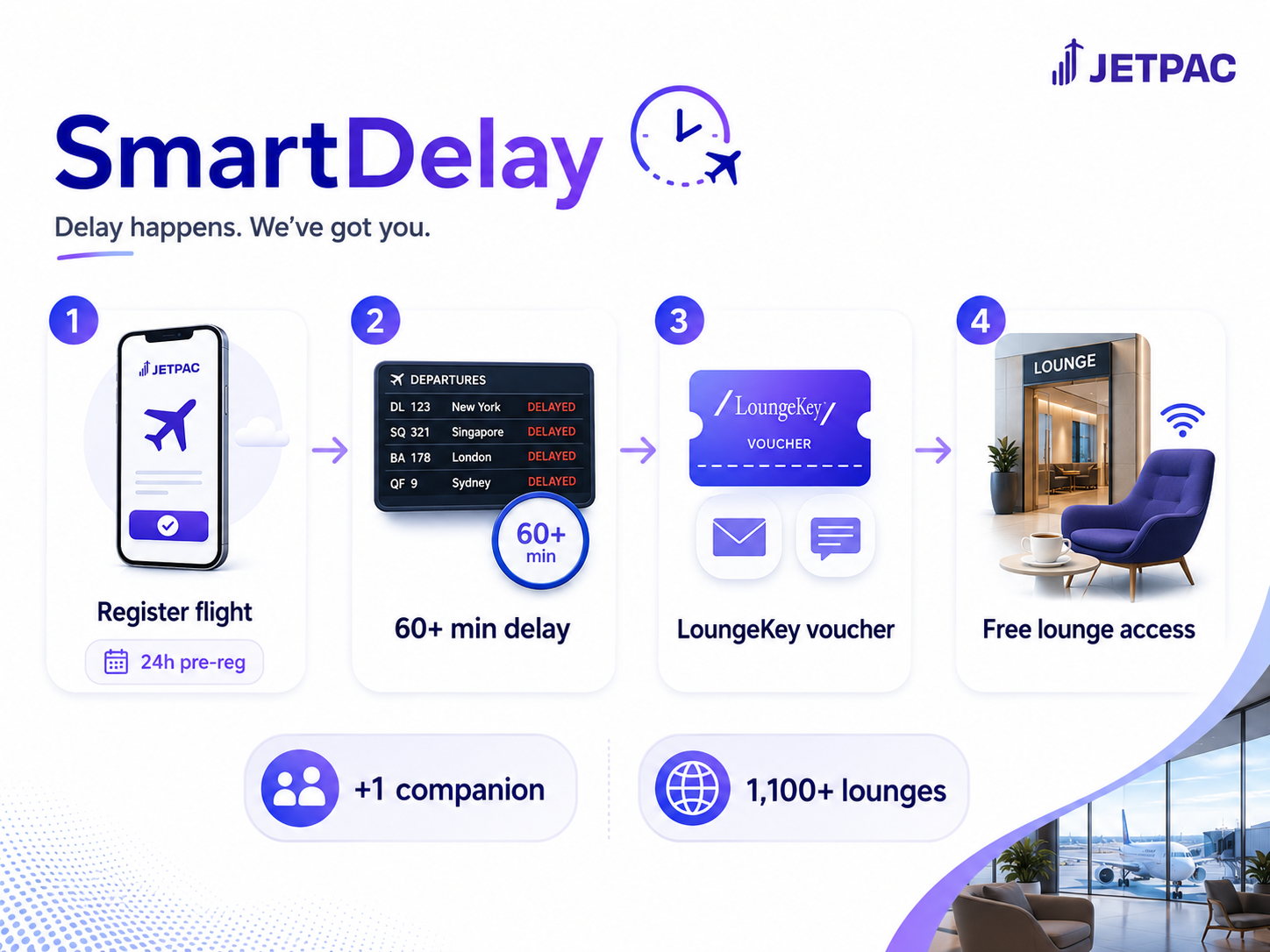
Every eSIM on the market sells you data. Jetpac sells you data and then gets you into an airport lounge when your flight goes sideways. It's called SmartDelay and runs on Collinson's LoungeKey network, which covers 1,100+ lounges worldwide. The same infrastructure behind Priority Pass and DragonPass, except you're not paying $32 a visit.
Setup takes two minutes. After buying any Jetpac pack, open the app, go to SmartDelay, and enter your flight number and departure date. Register any time after booking, but no later than 24 hours before departure. You can add one companion, and each data pack covers up to two flights.
When FlightStats reports a qualifying gate delay, Jetpac sends the LoungeKey voucher straight to your email. Show it at the entrance and walk in.
Who actually benefits from this? Economy travelers without a premium credit card or airline status. If you're flying Ryanair or AirAsia and your flight goes sideways, you have no lounge fallback. This is it, at no extra cost.
A few real limitations I came across:
- Delays under 60 minutes don't qualify, even if they result in a missed connection
- Weather and ATC-coded delays may not trigger it, depending on how the airline files the reason
- Coverage is strong at major hubs like Changi, Heathrow, and Frankfurt, but thin at smaller regional airports. Check the lounge finder if you regularly fly from a secondary airport.
SmartDelay is included with every Jetpac pack, from the $1 new-user trial upward. No competitor at this price point offers anything close.
Jetpac: Installation and activation
Setup takes around five minutes on an iPhone. Android can take slightly longer if manual APN configuration is needed.
Here is the full step-by-step process:
- Download the app. Search "Jetpac Global" in the App Store or Google Play.
- Create an account. Sign in with your email (a one-time verification code is sent, no password required) or continue with Google or Apple ID.
- Buy a plan. Select your destination, choose a data size, and pay in-app via card, Apple Pay, or Google Pay.
- Install the eSIM. On iPhone: Settings → Mobile Data → Add eSIM. Name the line "Jetpac" and follow the activation steps. On Android: Settings → Connections → SIM Manager → Add eSIM. Some Android models require you to enter APN settings manually. Jetpac's help center lists the correct APN by carrier.
- Turn on data roaming. This step is easy to miss. Go into your mobile data settings and make sure roaming is enabled specifically for the Jetpac line.
- Land and connect. The plan activates automatically when you arrive. Most users are online within two to three minutes of landing.
Two things to get right before you start. First, install on Wi-Fi, not mobile data. Installing an eSIM profile over cellular causes failures. Second, after activation, turn off automatic data switching on your device. If your phone reverts silently to your home carrier's data connection, you will be charged roaming rates and wonder why Jetpac is not working.
Jetpac: Compatible devices
Brand | Compatible Models | Notes |
iPhone | XR, XS, XS Max, 11–17 series (all variants) | iPhone 14+ in the US is eSIM-only. China/Hong Kong models may not work |
iPad | 7th gen+, Air 3+, Mini 5+, Pro 11"/12.9" 3rd gen+ | Cellular/LTE models only |
Samsung Galaxy | S20–S25 series, Note 20/Ultra, Z Fold/Flip series, A54 5G | US, South Korea, China, and Hong Kong variants of S20/S21/Note 20 Ultra are NOT compatible. FE models not supported |
Google Pixel | Pixel 3 through Pixel 10 series | Some older Pixel 3/3a models from AU/JP/TW are not supported |
Huawei | P40, P50, Mate 40 Pro | Non-China-purchased units only |
Motorola | Razr (2019+), Edge series | Region-dependent |
Others | Oppo, Vivo, Xiaomi, OnePlus, Nokia, ASUS, Honor | Model-specific. Check the compatibility page before buying. |
If you are on a recent flagship like the iPhone 17, Pixel 10, or Galaxy S25, compatibility is confirmed. Jetpac's device page was last updated in November 2025 and covers current models.
For any older or less common device, use the compatibility checker at jetpacglobal.com before purchasing. Jetpac's support team also confirms compatibility over WhatsApp in minutes.
Jetpac: Customer support
Support is available via in-app live chat, WhatsApp, and email at support@jetpacglobal.com, with round-the-clock availability advertised across all three channels. Email is quoted within 24 hours; most reviewers report WhatsApp responses well within that, regardless of the hour.
Customer support is the most praised element; users regularly describe issues being closed within 10 to 30 minutes via WhatsApp.
Negative reviews cluster around Android installation failures (almost always solvable with manual APN setup), regional connectivity gaps, and occasional SmartDelay voucher delays. Reddit threads echo this, with iPhone and mainstream Samsung users rarely posting problems at all.
Jetpac: Final verdict
For most international travelers, Jetpac lands in a strong position. Data packs are priced fairly, the single reusable eSIM is a practical convenience, and SmartDelay is the kind of perk that actually changes the experience of a delayed flight, not just something listed on a features page.
The $1 new-user trial is the right starting point. Buy it before a trip, verify coverage works on your specific route, and size up from there. The risk is as low as a dollar.
The real limitations are specific. The global plan covers 96 countries, not 200+. Unlimited plans throttle usage after 3GB per day, making them a poor fit for remote workers or heavy streamers. Android setup is less smooth than iPhone. And SmartDelay only covers one companion, not the five older reviews suggest.
If you need a local incoming number, a truly unlimited high-speed connection, or coverage in very remote areas, competitors like Holafly or Airalo are worth comparing. For the frequent economy traveler who wants working data and airport perks without a premium credit card, Jetpac is the best option in its price range.
Jetpac: FAQs
Does Jetpac offer airport lounge access?
Yes. Every Jetpac data pack includes SmartDelay, which provides free lounge access through the LoungeKey network (1,100+ lounges worldwide) when a registered flight is delayed by 60 minutes or more. You and one companion are covered. Paid DragonPass lounge passes are also available in the app for use without a delay.
How does SmartDelay work?
You register your flight in the Jetpac app at least 24 hours before scheduled departure. If FlightStats reports a qualifying delay of 60+ minutes, Jetpac automatically sends a LoungeKey voucher to your email and an SMS notification. Present the voucher at the lounge to gain access. No manual request or support call is required.
Can I use Jetpac on a cruise?
Jetpac covers land-based destinations and does not support maritime or satellite connectivity. At sea, the eSIM will not function. When your ship docks at a port in a covered country, the eSIM should pick up the local network, though signal quality depends on how close to shore you are and what carrier coverage exists at that port.
Does Jetpac support hotspot sharing?
All Jetpac plans include unlimited hotspot tethering with no separate data cap. You can share your connection with a laptop or tablet on any plan. If you are on an unlimited plan, tethered data counts toward the 3GB daily full-speed allowance, after which tethering continues at 1Mbps.
Is Jetpac cheaper than carrier roaming?
In almost every case, yes. Most international roaming plans from carriers charge $5–$15 per day for capped data. Jetpac's Europe plan offers 10GB covering 30+ countries for around $22 on sale (around $32 at standard pricing, verified June 2026). On a typical one-week trip, the savings are often $60–$100 compared to carrier roaming, and the lounge perk comes with it.
Can I get a refund from Jetpac?
Yes. Jetpac offers a 30-day refund window for data packs that cannot be installed or activated due to a verified technical problem on Jetpac's side, after completing troubleshooting with the support team. Refunds are not issued for device incompatibility or for packs that have been successfully activated and used. Approved refunds are processed within 5–10 business days to the original payment method.
Does Jetpac work with iPhone?
Jetpac is compatible with iPhone XR and all models through the iPhone 17 series. iPhones purchased in mainland China and Hong Kong may not be eSIM-capable. US iPhones from iPhone 14 onward are eSIM-only and fully supported. The device must be carrier-unlocked for the eSIM to work.


Comments
Post a Comment