I wanted to love the Logitech G512 X, but two keyboards in one don't always add up to a single great product
Logitech G512 X two-minute review
The Logitech G512 X reminds me of what Citroën tried to do with the C3 Pluriel — a car so busy trying to be everything that it ended up being not quite enough of anything. This is a keyboard that seeks to blur the lines between gaming and enthusiast-grade, which is a tricky line to walk — and one that the G512 X doesn't quite manage.
On one hand, it's trying to be one of the best keyboards money can buy, with capable tactile switches, gasket mounting and strong acoustics, and on the other, it's positioning itself as a top-end TMR gaming deck with potent HE switches with rapid trigger, dual actuation and all the rest of it. For $199.99/£199.99, this feels like a two-for-one deal I can get behind, but only in some respects.
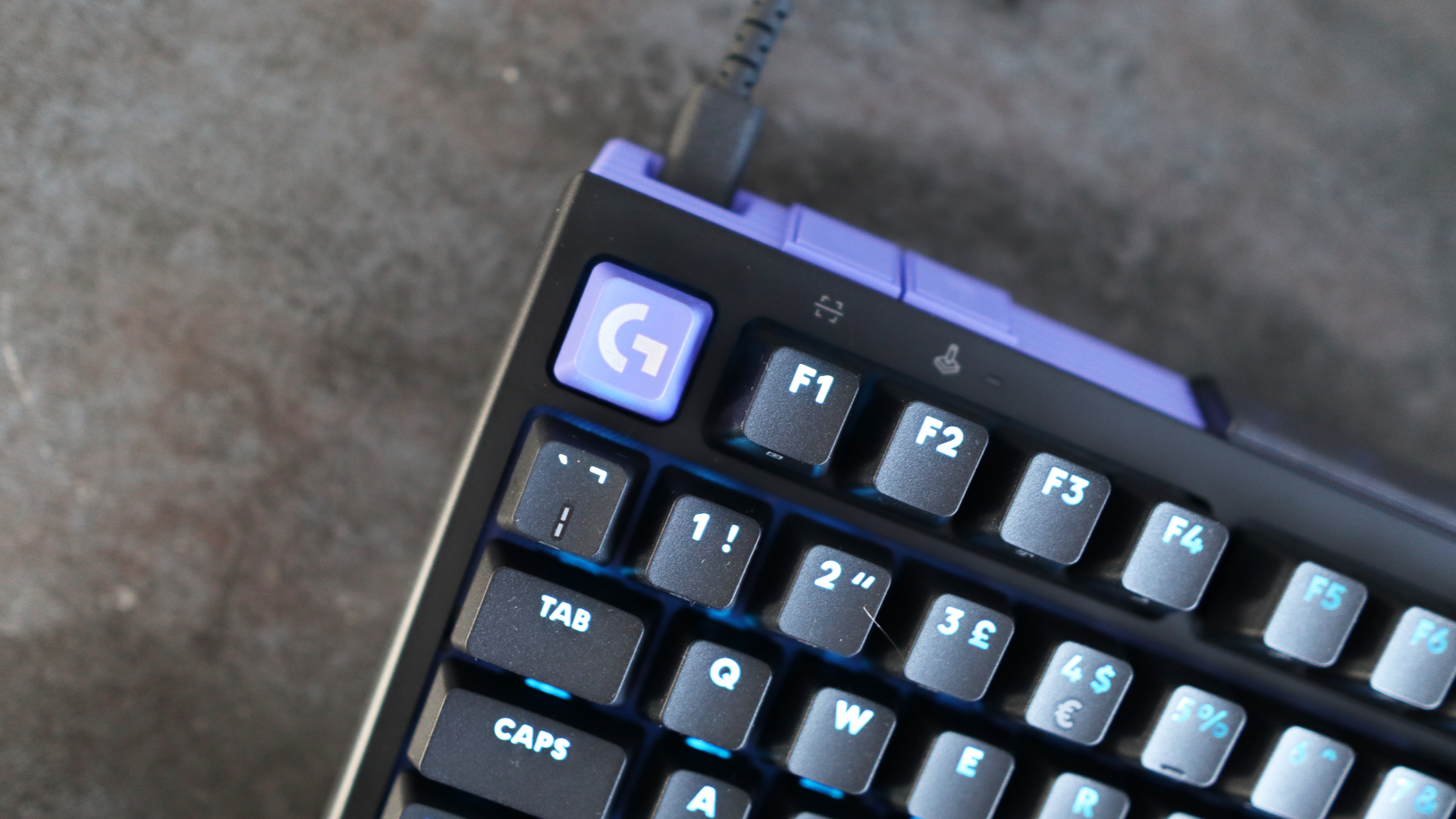
In practice, the G512 X impresses with strong mechanical credentials and fast analog switches that can be swapped in an instant with the bundled pullers to provide the precision and power more competitive gamers will appreciate. I also like the clean software and the pleasant and rather striking black and purple chassis (it can also come in white and mint).
However, there are several limits to its powers that, to me, stop it from being a top contender for one of the best gaming keyboards out there. For instance, the chassis here is predominantly plastic and can flex at the corners, meaning the Keychron K2 HE Concrete Edition is a much stronger bet for build quality, while the fact that the analog hot-swappable powers only extend to 39 of the keyboard's switch sockets just feels like an oversight. The likes of the Cherry Xtrfy MX 8.2 Pro TMR Wireless and Glorious GMMK 3 Pro HE have already addressed this more convincingly with full hot-swap support.
Likewise, the high price tag is hard to ignore, even if you're getting some genuine cleverness here. The likes of the Cherry Xtrfy K5 Pro TMR Compact and Corsair K70 Pro TKL offer as much, or more, gaming grunt for a lower price, and the aforementioned Keychron adds wireless connectivity for an identical price. Nonetheless, it's still more affordable than the SteelSeries Apex Pro TKL Wireless Gen 3.
Logitech G512 X review: Price & release date
- Costs: $199.99 / £199.99
- Available May 2 2026
- Towards the top end of the market
The Logitech G512 X is available in two sizes, and therefore two prices, with the 96% option I have here the dearest at $199.99/£199.99. If you wanted the smaller 75% option, you'll be paying $179.99/£169.99. The keyboard is currently available for pre-order, with shipping from May 2 2026.
The price puts it towards the top end of the market for similar Hall effect gaming keyboards, and it's similar in a lot of respects to the Corsair K70 Pro TKL. The Cherry Xtrfy K5 Pro TMR Compact is also a potent wired choice, and is a fair bit cheaper than Logitech's offering, although it lacks some of the versatility of the G512 X.
Other more pro-oriented products that this keyboard is designed to compete with, such as the Razer Huntsman V3 Pro TKL and the SteelSeries Apex Pro TKL Wireless Gen 3, cost a bit more, though, arguably due to having extra software trickery or wireless connectivity options.
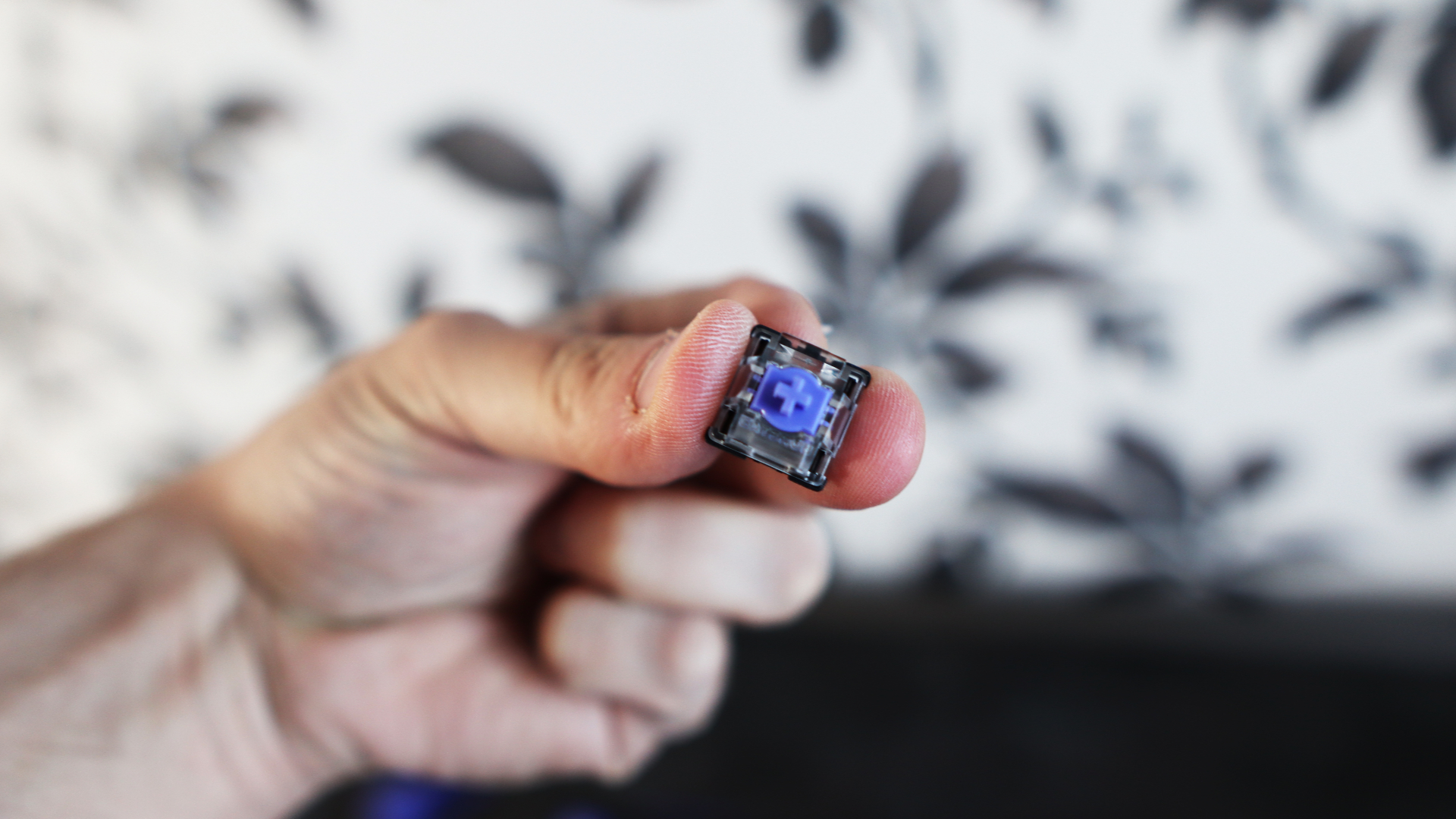
In the box, Logitech provides the keyboard itself, a USB-C to USB-A cable for wired connectivity, switch and keycap pullers that double as feet and documentation. There is also a wristrest available, although that is a separate purchase.
- Price score: 3.5/5
Logitech G512 X review: Specs
Layout: | 96% (75% also available) |
Switch: | Gateron KS-20 (analog), Unknown Brown tactile (mechanical) |
Programmable keys: | Yes |
Dimensions: | 13 x 5.9 x 1.9 inches / 386 x 150 x 48mm |
RGB or backlighting: | Yes (customisable) |
Logitech G512 X review: Design & features
- Stylish black and purple chassis
- Build quality leaves a lot to be desired
- Reasonably intuitive layout
Logitech has opted for a different look to a lot of its other past gaming keyboard efforts with the G512 X, adding a welcome splash of color, such as the purple-accented Esc and arrow keys, alongside the dual dials in the right corner and the color that's sandwiched in between the black of the frame down the sides and around the back. Both sizes of the Logitech G512 X can also come in white with mint accents, and you can swap out the colored keycaps for ones that match the rest of the body for a more uniform look.
There's a certain style here that I'm quite a fan of, alongside the diffused lighting aesthetic across the front.
For a $200 keyboard, the fact that the frame feels like it's mostly plastic isn't a great first impression, especially as rivals incorporate a lot of metal for sturdiness, or even go as far as to make the case out of a material such as resin, or concrete, in the case of Keychron's latest entry.
This has the effect of making the chassis flex under heavy pressure both in the middle and at the corners, giving the G512 X a much cheaper feel that I'm not a fan of, not least from a brand that should (and can) do better. Despite this, there is a decent amount of heft to the frame, with it tipping the scales at 2.2lbs/1kg, which means some thought has gone into it. Just not enough in my book.
The fit and finish elsewhere is quite reasonable, with pleasant PBT keycaps under the finger that have a nice grip for comfortable typing. PBT is a more durable plastic than the swathes of ABS I'm used to seeing on more mainstream keyboards, and is also much less resistant to the horrible keycap shine that plagues ABS-capped boards after a fair amount of use.
Logitech offers the G512 X in two layout varieties, with either a 75% or a 96% configuration available. The former offers the benefit of a TKL layout (also known as Tenkeyless, which means the keyboard doesn't have a numpad) in a slightly squished-up fashion, with an F-row, arrow keys and a single column nav cluster alongside the usual alphanumeric keys.
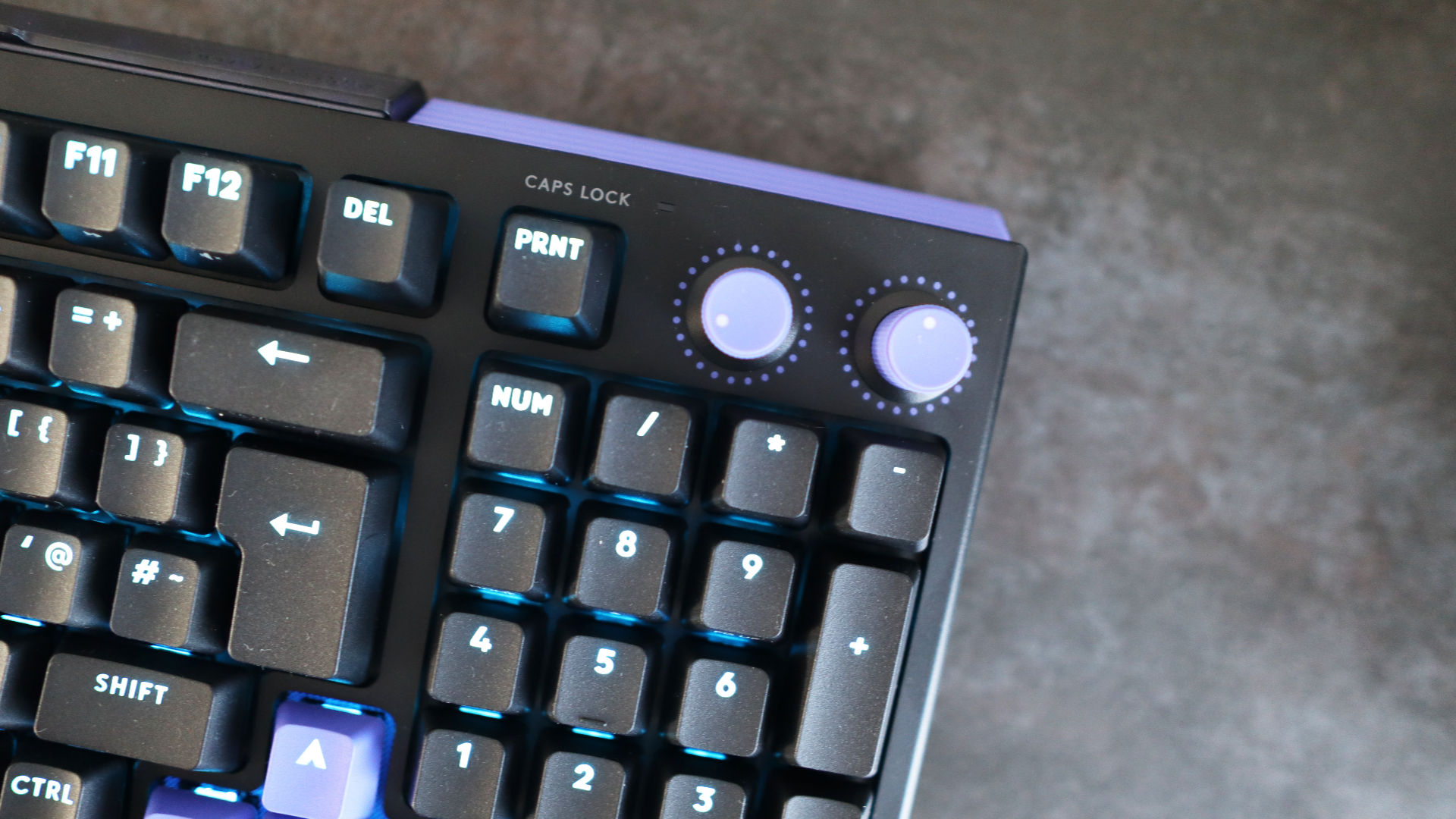
The 96% layout is the one I have, and it supplements this with a number pad. The placement of keys against other keyboards of this form factor I've tried is different, owing to the two dials in the top right. By default, the dials control backlight level (left) and media volume (right), although they can be remapped in Logitech's G Hub software. Usually, the navigation keys are moved above the number pad, but they're now part of a function layer, with only the Print Screen key above the number pad. Otherwise, this is a method of packing in most of the functionality of a full-size keyboard into a slightly space-saving chassis.
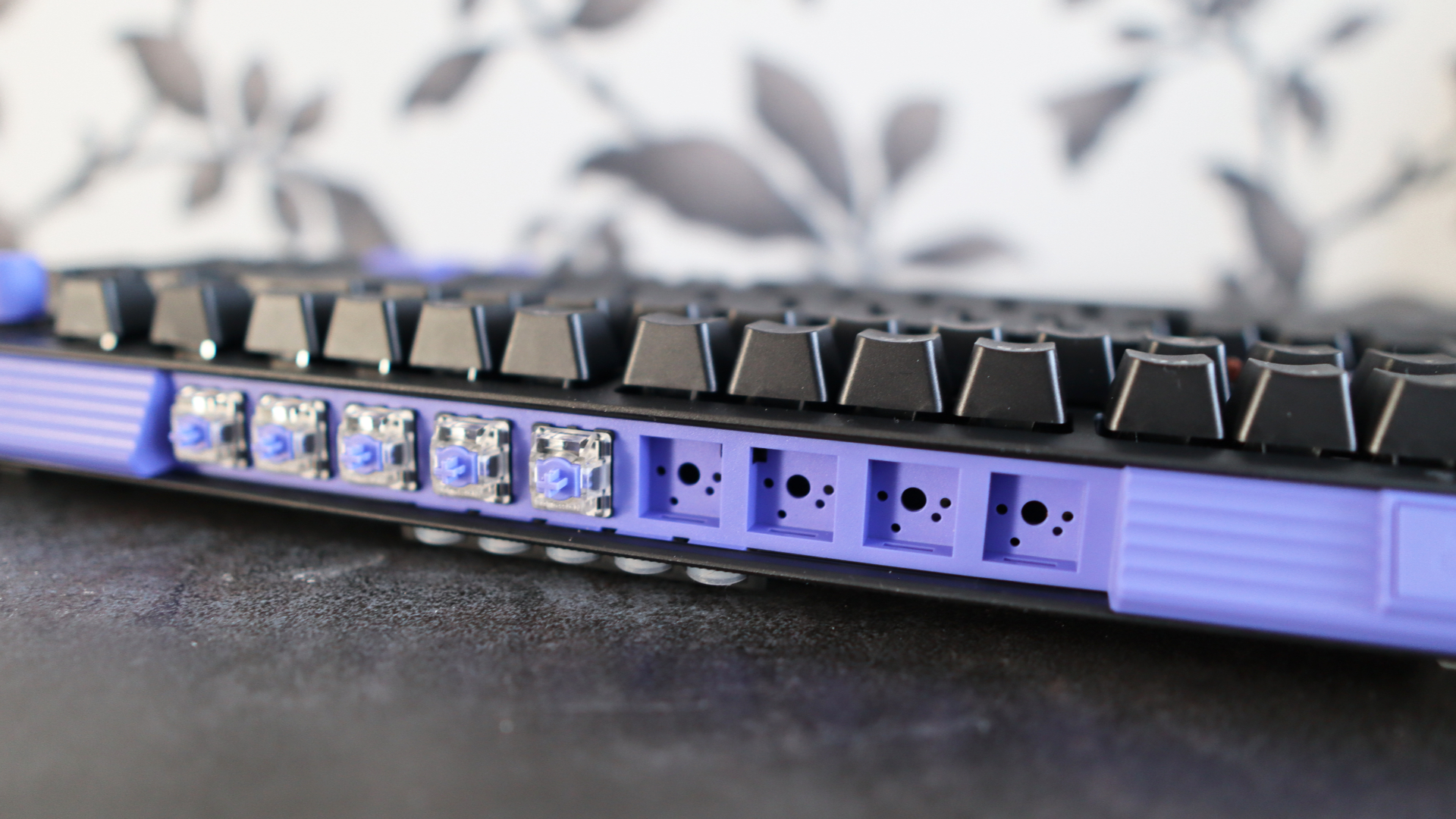
The interface around the back is where things get a little interesting, as you'll find standard features such as a USB-C port for wired connectivity, plus two buttons – one for scanning the keyboard to check for any analog switches installed (this is then reported into software for customization purposes), while the other enables Game Mode. In the middle, there is a cubby hole for the nine Gateron KS-20 analog switches that can be swapped into the keyboard and a shelf for five silicon rings that can be placed around a switch to help denote where a secondary actuation point is (if they're set in the software).
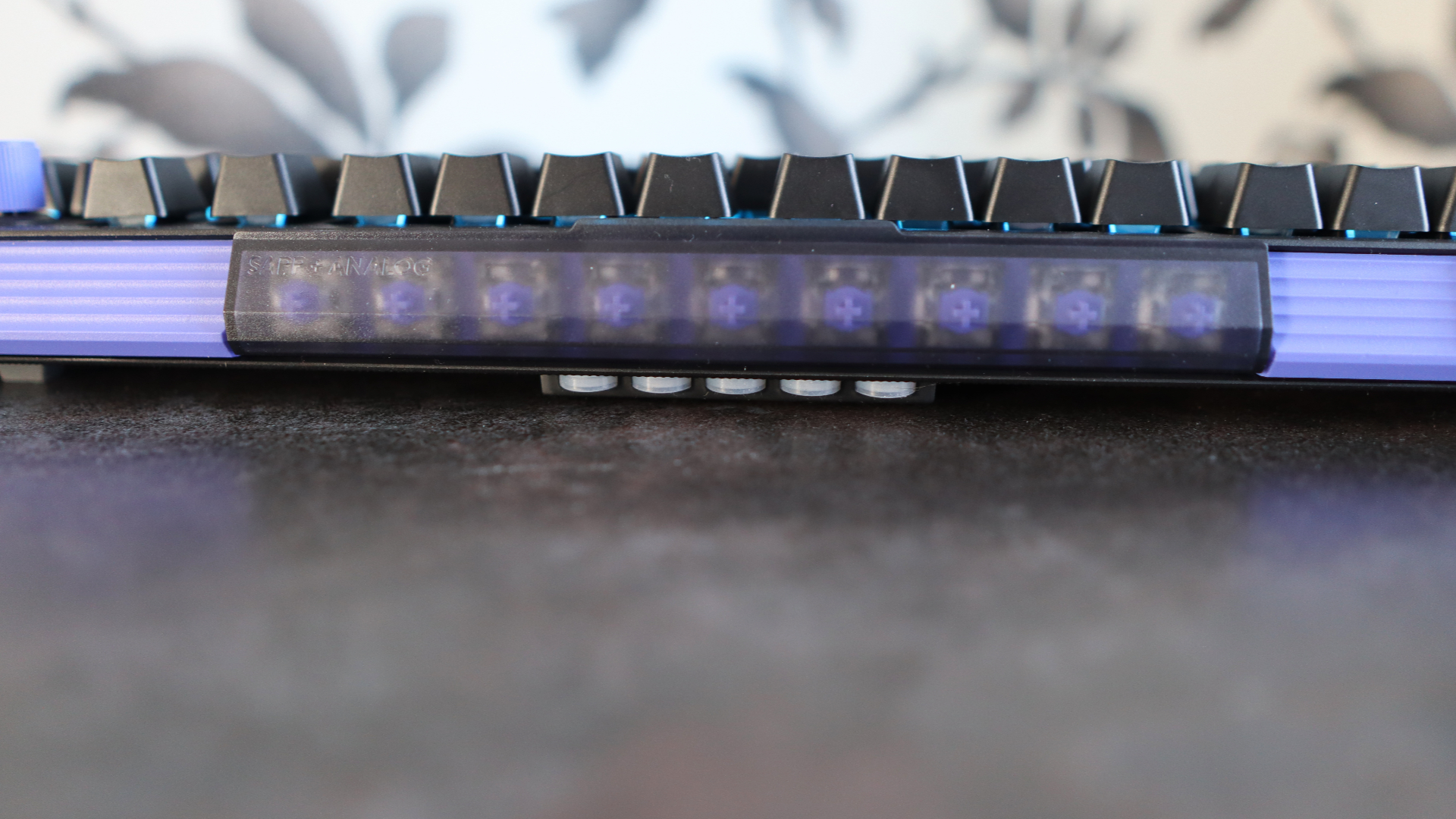
I like the clever use of storage space on the rear of the G512 X, and I think it's a smart feature that other keyboard makers could take notice of. The silicon rings do tend to fall out of the back of the keyboard, though, if you move it around.
On the underside, you'll find some small feet that raise the keyboard up by default to a more comfortable angle, although the included keycap and switch pullers also double as feet for an even taller angle. Getting these into place in between the existing feet is quite finicky, and they don't feel the most secure.
On the topic of software, G Hub handles configuration duties for everything from RGB lighting control to key remapping and dealing with rapid trigger and actuation point options. For rapid trigger and such, you can program inputs on a scale from 0.1mm all the way down to 4mm, giving a lot of configuration. There are also options here to set two actuations per key and deal with SOCD tech, which I'll get into later.
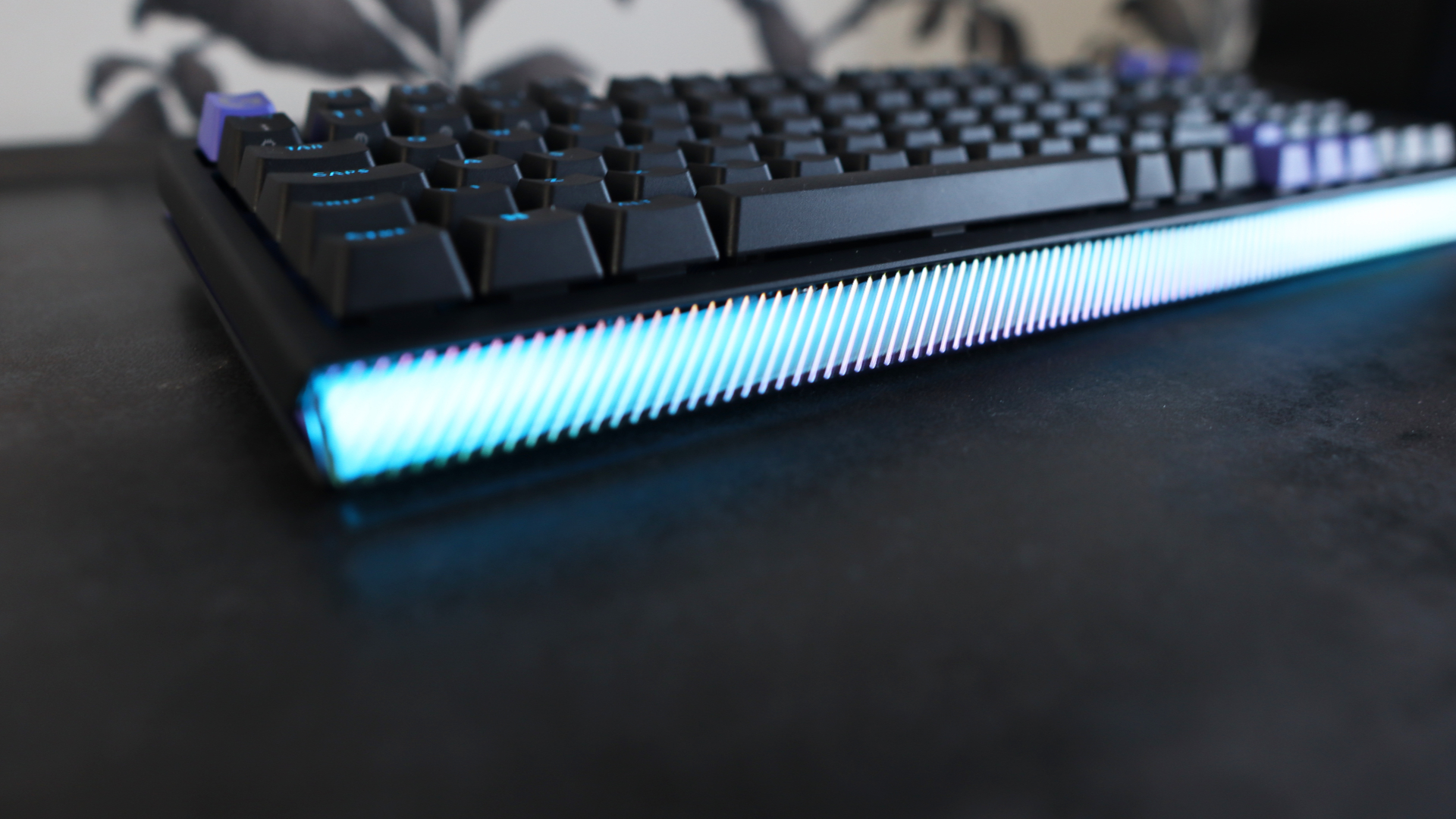
The RGB lighting here is rather bright, and there is a good deal of customization offered in the software to change colors, patterns and the like. My only criticism is that in a lot of cases, the backlighting doesn't extend to the edges of some of the legends.
- Design and features: 3.5/5
Logitech G512 X review: Performance
- Tactile mechanical switches by default…
- …which can be swapped to HE switches for more speed and precision
- Solely wired connectivity, although with 8000Hz polling rate
It's on the front of what's inside the G512 X where things get quite intriguing, as this is one of only a handful of keyboards out there that'll accept both more standard mechanical switches and magnetic or analog switches in one go. The only others that spring to mind are the Glorious GMMK 3 Pro HE and the Cherry Xtrfy MX 8.2 Pro TMR Wireless, although in this respect, I'd argue both of them have a leg up on Logitech.
That's because this 'board only accepts its analog TMR switches on 39 of the hot-swappable sockets, mostly on the left side of the keyboard, as that's where most of the switches pressed for gaming exist – the arrow keys are the only notable exception, according to Logitech. I understand why they've done this, but surely it would've made more sense to offer that precision and power across the entire alphanumeric set, rather than just over half of it.
This keyboard ships first and foremost as a more traditional mechanical choice, with it available either with indeterminate Linear or Tactile switches; my sample shipped with the latter. I feel it is quite important to note that some of the documentation I was provided with for this keyboard calls these switches 'MX Mechanical Switches' when I can find no evidence that these are proper Cherry MX switches. There isn't any branding on them to suggest so, for instance, and the housing doesn't look like the MX Browns I'm so used to, leading me to believe these are some form of clones.
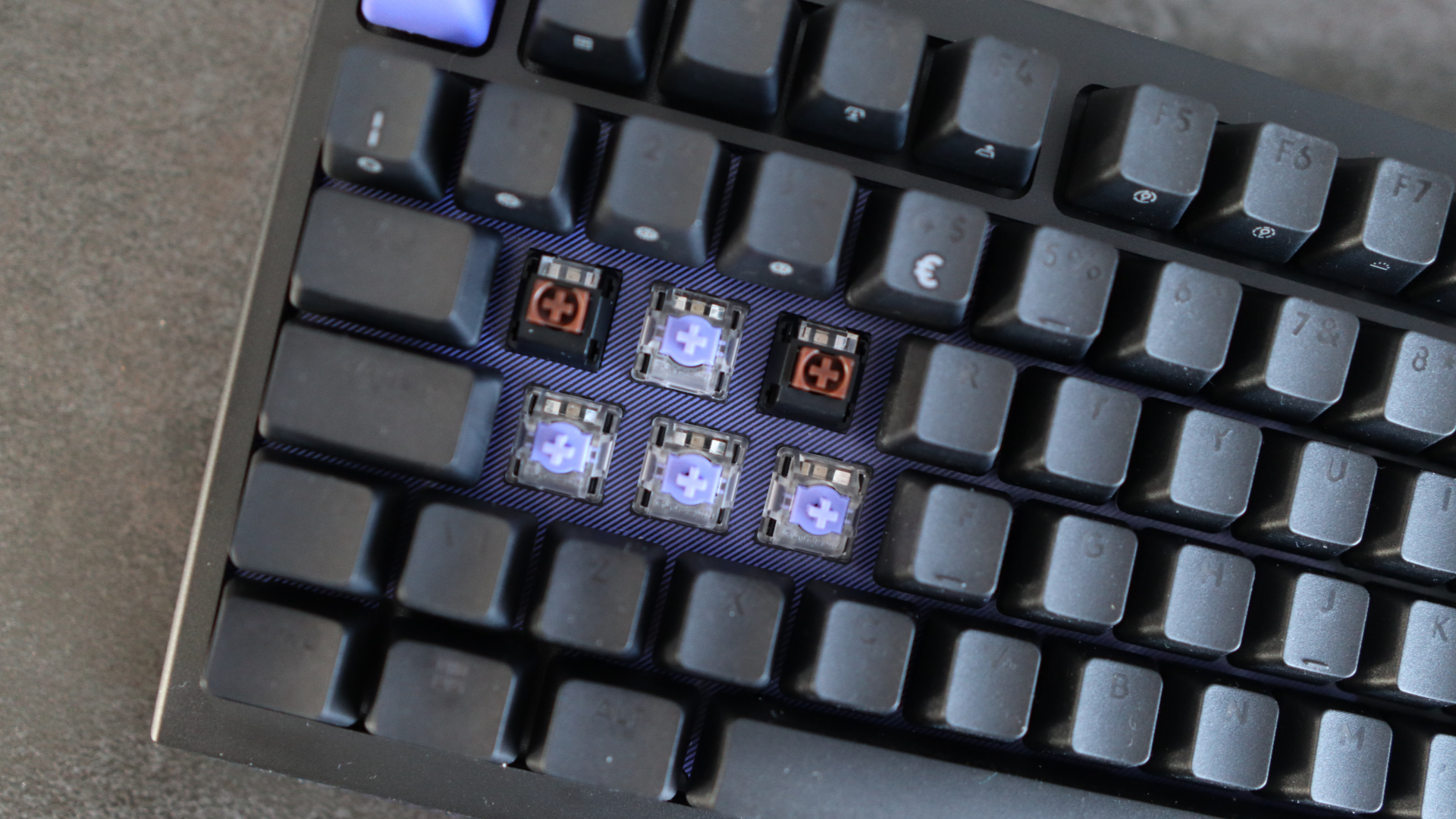
To be fair to Logitech, the clones it has fitted provide a positive actuation with a healthy bump halfway down the travel alongside a smooth travel and a surprisingly light 38g weighting.
Acoustics here are strong, with no case rattle or ping from the stabilisers or internal mechanism, while the G512 X also has internal gaskets to provide a slightly more responsive, 'bouncier' feel under finger. There is a fair amount of key wobble, though.
Hot-swap support for the standard mechanical switches is the usual MX-style three or five-pin switches, and it works the way you'd expect, with no soldering or funny business required. Just note that the bundled switch and keycap pullers Logitech has provided aren't great at doing their job, so you'll want to find a combo puller or separate ones from elsewhere. It took me several attempts before I even got a grip on either the keycap or the switch.
When it comes to the analog switches, Logitech has opted to use Gateron KS-20 Hall effect switches for the nine included on the rear of the keyboard, which I've seen fitted to HE keyboards in the past from the likes of Wooting and even Sony. These feel as I expected, with a smooth keypress afforded by having no physical mechanism inside and all the benefits of speed and precision over what comes by default inside the G512 X.
The key thing here is that these are powered by TMR sensing sockets, rather than the more ubiquitous Hall effect, which is something we're seeing become more common with gaming keyboards in 2026. Without getting too much into the weeds, TMR stands for Tunnel Magneto-Resistance, and is a technology we've mostly seen applied to game controllers rather than keyboards. It's essentially designed to offer a greater degree of precision and general responsiveness over the litany of Hall effect products we see in controllers and keyboards.
It's also meant to be more power-efficient, although as this is a purely wired keyboard, it isn't that important compared to wireless TMR keyboards from other folks.
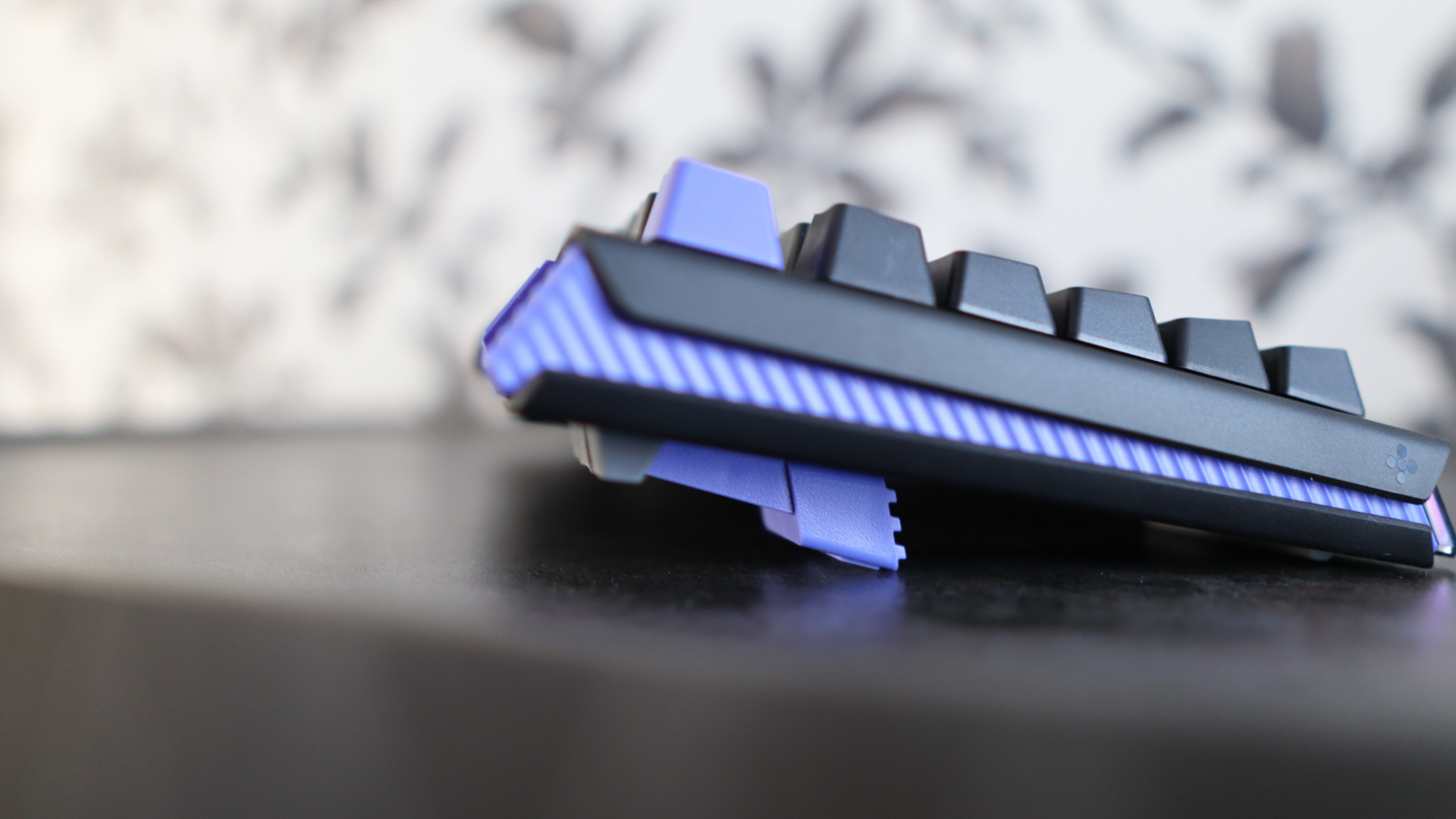
As much as this is a keyboard you can use for general day-to-day stuff with its full mechanical set, it's more at home when you use the keycap and switch pullers and swap out the mechanical switches for analog ones, which is very easy. For my testing, I elected to swap the WASD keys, Shift and the 1, 2, and 3 number keys for speed in Counter-Strike 2 for movement, crouching and weapon selection.
With those switches swapped out, you can go into Logitech's G Hub and scan the keyboard, which will recognise the new switches as being analog, and you can then configure things such as rapid trigger, dual actuation and more. I didn't set the actuation and reset as high as 0.1mm, as I've often felt that's too sensitive, and instead set it to a more reasonable 0.5mm.
This decision essentially turns these switches into hair triggers. It means inputs required very little effort, which becomes very handy in quick-draw scenarios where you need to bring a weapon out or throw a grenade as quickly as possible.
Using G-Hub also opens up more advanced features, such as dual actuation, where you can go through a switch's travel with two inputs mapped. This is where the little o-rings that Logitech provides come in, as they're specifically designed to notify you when that second input should be recognised.
There are limits to the G512 X's powers, though, as its switches don't support more progressive and controller-like analogue inputs, as you'll get on rivals from the likes of Wooting and Keychron at this price. This is handy if you wanted to play racing titles such as Forza Horizon 5 with your keyboard.
Logitech provides its own flavour of SOCD tech, known as 'key priority', which is controllable in G Hub, and can be mapped to seemingly any pair of switches. It allows you to activate one key while holding down the other for especially quick actions. In this instance, it works based on the most recent one pressed; for instance, if mapped to the A and D keys (the typical default in a lot of rival choices), it can allow for unnaturally quick side-to-side movement for a tactic known as 'jiggle strafing' in Counter-Strike 2.
It's very clever, although not something you'll probably use too much in online games, given Valve wields the ban hammer for anyone who uses it in online Counter-Strike 2 games.
Connectivity with the G512 X is strictly wired, with no Bluetooth or 2.4GHz wireless choices available. Over this wired connection, you also get an 8000Hz polling rate for more frequent reporting of inputs than 'standard' gaming keyboards, which can lead to a more responsive feel. This isn't necessarily something that mere mortals can feel, although for the pros, where every millisecond counts, it's a useful addition.
- Performance: 4/5
Should I buy the Logitech G512 X?
Attribute | Notes | Score |
Value | The G512 X is quite expensive for a wired-only gaming keyboard, even though it boasts some clever features that make it rather versatile. You can get wireless choices at this price, alongside stronger enthusiast-grade mechanical options. | 3.5/5 |
Design and features | I like the look of the G512 X, with its black and purple-accented chassis and the convenience of its 96% layout, although the fact that there's a lot of chassis flex and it's mostly made of plastic leaves a sour taste for the price. | 3.5/5 |
Performance | There's no denying the G512 X is a clever keyboard, with its ability to swap out mechanical switches for HE ones virtually at will, with full compatibility for rapid trigger, SOCD and such with the latter, and this is a fast keyboard with the right switches inside to boot. I just wish it worked on more sockets. | 4/5 |
Overall rating | The G512 X is a curious product that makes for a good mechanical keyboard and a decent rapid trigger one, although it sometimes feels like its versatility is the very thing that lets it down, not least for a higher price tag and with a plastic chassis. I'd still rather have one great keyboard than two good ones. | 3.5/5 |
Buy it if…
You want mechanical and analog switches in one keyboard
The G512 X is quite unique in that it can offer the benefits of both tactile mechanical switches and analog options in one product, providing the comfort of one and the speed of another without needing to change keyboards.View Deal
You want striking looks
I'm also a big fan of the black and purple finish Logitech has opted for with the G512 X, which gives it quite a striking finish against its contemporaries.View Deal
Don’t buy it if…
You want more versatile connectivity
It is possible to get performance-focused gaming decks with wireless connectivity at a similar price to the G512 X, which is useful if you want less visible desk clutter or to connect to multiple devices at once.View Deal
You want something more affordable
As versatile as the G512 X is, it comes at quite a cost, especially if you don't need all of its features. You can sacrifice some elements, and opt for the likes of the Cherry Xtrfy K5 Pro TMR Compact or the Keychron K2 HE and get similar gaming-centric features while pocketing a few extra pounds or dollars.View Deal
Also consider
Corsair K70 Pro TKL:
This Corsair choice is similar in outlay to the G512 X 75% variant, and while it may not offer as much versatility as Logitech's choice, it provides a performance-focused option with fast HE switches, 8000Hz wired polling and comes with more physical controls and a wristrest. Read our Corsair K70 Pro TKL review.View Deal
Keychron K2 HE Concrete Edition:
This special Keychron choice ditches any potential issues with a plastic chassis by using one made of concrete, plus has feature-rich TMR switches with more customisation and input options, plus versatile wireless connectivity for the same price as the G512 X. It doesn't have any mechanical switch options, or 8000Hz polling, though.View Deal
How I tested the Logitech G512 X
- Tested for around a week
- Used for gaming and productivity across Windows and macOS
- A decade of experience as a journalist and mechanical keyboard hobbyist
I tested the G512 X for around a week, using it as my main keyboard for work and play during this time with both Windows and macOS.
I played various games, including Counter-Strike 2 and Forza Horizon 5, to best gauge its TMR switches. I also made sure to use Logitech's G Hub software to test every facet of the keyboard.
I've been a tech journalist for the best part of a decade, and have reviewed plenty of keyboards in that time from brands big and small. I'm also a mechanical keyboard enthusiast, so I have a keen eye for peripherals and have been involved with the hobby before it hit the mainstream.
- Read TechRadar’s reviews guarantee
- First reviewed: April 2026


Comments
Post a Comment