Namecheap web hosting review
Namecheap is known as one of the best domain registrars where you can find and buy whatever dot-com or other TLD you'd like to use for your website. According to Domainstate, it handles more than 14 million domains: only GoDaddy has more.
But there's much more to Namecheap than domains. The company has steadily been increasing its range of the best web hosting products, covering everyone from bargain-hunting first-timers to demanding business users.
Recent additions include Namecheap's own content delivery network (CDN), which accelerates your website's speed for visitors worldwide. The company even offers a budget VPN to keep you safe on public Wi-Fi and let you access regional content from other countries.
- Want to try Namecheap? Check out the website here
What types of hosting does Namecheap offer?
Namecheap's range starts with low cost and easy-to-use shared hosting, a perfect choice for first-timers and less demanding websites. There are Namecheap promo codes for bringing the cost down even more too.
Namecheap also offers EasyWP, a managed WordPress hosting option with valuable site management features and more resources delivering extra speed. If you need more power and freedom than that Namecheap' also offers VPS and dedicated hosting.
Namecheap shared hosting
Using a shared hosting plan means your site is hosted on a single server along with many others. That's great for value, as the server costs are shared across multiple accounts, but it can hurt speed and reliability. Sharing a server's CPU, RAM, and network connection with other sites can disrupt your services because they may experience traffic spikes that consume shared resources. There's no sign that Namecheap's shared hosting is overloaded, but it's always something you need to keep in mind when choosing a shared hosting service.
Namecheap's shared hosting range looks, well, seriously cheap, with headline prices starting at just $1.98 a month over two years ($4.88 on renewal).
A good set of core features includes a free domain, free migration, a bundled website builder, unlimited bandwidth, and at least twice-weekly backups. Softaculous is on hand to speedily install WordPress and 150+ other apps, and cPanel has all the power you'll need to manage your web space.
Even the cheapest plan supports hosting three websites, too (the others allow unlimited sites). Most providers only allow a single site on their starter shared plan.
All shared hosting plans come with 50 free SSL certificates for the first year. If you do not want to pay the $6.99/year to renew one, you still get free SSL through cPanel.
|
Plan |
Starting price |
Renewal price |
|---|---|---|
|
Stellar |
$1.98 |
$4.88 |
|
Stellar Plus |
$2.98 |
$6.88 |
|
Stellar Business |
$4.98 |
$9.88 |
Namecheap WordPress hosting
WordPress is a hugely popular website creation platform with over 40% of the world's sites using the CMS. It's easy for beginners to use, yet powerful enough to build huge business websites and leading-edge web stores.
Namecheap's EasyWP plans are more expensive than its shared hosting plans, but they offer more resources and are specifically optimized to deliver faster WordPress speeds (Namecheap says they're at least three times faster than regular WordPress on its shared hosting account).
EasyWP Starter offers 10GB of NVMe storage, a free CDN to boost performance, and support for a single site with unlimited monthly visitors. It looks cheap at $3.24 a month on the annual plan and $5.74 on renewal, though there is one catch: the SSL is free only for Namecheap domains. This is where the price can start to increase: Positive SSL for 5 years is $5.99 and renews at $6.99 per year. If you want to manage all your hosting and services in one place, Namecheap is a good option, but if you want to distribute your services across multiple providers, hosting with Namecheap might not be the best option.
The other EasyWP plans add more storage and resources. The top-of-the-range EasyWP Supersonic plan comes with the most goodies, but still offers fair value at $6.57 a month on the annual plan and $11.57 on renewal.
The plans have some weaknesses. They support creating only one website, and you don't get the same range of WordPress-oriented features as some of its top competitors offer.
If Namecheap doesn't have the power you need, consider SiteGround's WordPress hosting range. These start at $3.99/mo with relatively modest resources. However, SiteGround also offers advanced WordPress and AI-based tools for you to play with.
|
Plan |
Starting price |
Renewal price |
|---|---|---|
|
EasyWP Starter |
$3.24 |
$5,.74 |
|
EasyWP Turbo |
$5.16 |
$9.57 |
|
EasyWP Supersonic |
$6.57 |
$11.57 |
Namecheap VPS hosting
Virtual Private Server (VPS) hosting is faster and more configurable than shared hosting. But it's also relatively expensive, and more complex to set up and manage, which means it's not an ideal choice for novice users with simple, low-traffic sites.
If you're an expert or have a more demanding website, though, it's a very different story. A good VPS can give you massive control over your server, and the power to handle hundreds of thousands of visits a month, sometimes for less than the cost of high-end shared hosting.
Namecheap's VPS hosting starts at $6.88 a month, billed annually, for a 2-core CPU, 2GB RAM, 40GB NVMe storage, and 1 TB bandwidth (renews at $9.88). While that looks cheap, keep in mind that it's an unmanaged system, which means you're left to run the server yourself (add, install, and update software, restore a failed server, and more). You don't even get a control panel.
Managed VPS is easier to use, but also more expensive. The unmanaged Quasar plan is $12.88 billed monthly for a 4-core, 6GB RAM, 120GB storage, and 3TB bandwidth system. Adding complete server management and cPanel lifts the price to $54.76 (and you can add $1.50 a month if you need Softaculous to install WordPress or anything else).
Namecheap's top-of-the-range Magnetar VPS plan is more powerful, with 8 CPU cores, 12GB RAM, 240GB storage, and 6TB bandwidth. It's $28.88 billed monthly for an unmanaged system, rising to $63.76 with the managed option.
The significant advantage of Namecheap's VPS range is its price. We often recommend Hostwinds' extensive VPS range, but what do you get for $29 a month there? Two CPU cores, 6GB RAM, and 100GB storage, a far less capable system.
The problem with Namecheap is that it offers only three VPS plans, and they're not as configurable as the best in the competition. If Namecheap's choices don't suit your needs, you'll find far more appealing deals elsewhere.
If you're on a budget, IONOS' cheapest VPS plan starts at $2 billed monthly, for instance. It's as basic as a VPS gets (1 core, 1GB RAM), but it's ideal for learning how the technology works.
At the other end of the market, InMotion Hosting's VPS hosting is crammed with features, with great support, and is primarily for more demanding business users.
|
Plan |
Starting price |
Renewal price |
|---|---|---|
|
Pulsar (2 CPU cores, 2 GB RAM, 40 GB storage) |
$6.88 |
$9.88 |
|
Quasar (2 CPU cores, 2 GB RAM, 40 GB storage) |
$12.88 |
$15.88 |
|
Magnetar (2 CPU cores, 2 GB RAM, 40 GB storage) |
$24.88 |
$28.88 |
Namecheap dedicated hosting
Opt for shared or VPS hosting and you're forced to share your web server with others. Sign for a dedicated package, though, and it's entirely yours. RAM, CPU time, the network connection, it's all reserved for your website only, so you'll never again be slowed down by what's happening with other accounts.
Namecheap used to offer only a handful of dedicated server deals, but right now there are 58. There's something for everyone, with prices starting low at under $50 billed monthly for an unmanaged 4 core, 8GB RAM system, rising to around $250 for a 16 core CPU with 128GB RAM and fast-as-it-gets 4 x 1.92TB SSD NVMe storage. All plans include free site migration and a 99.99% uptime guarantee.
As with VPS hosting, the lowest prices are for unmanaged systems (you must run the server yourself.) Choosing the Complete Management option (Namecheap maintains the server for you) with a cPanel Solo license adds around $65 to the server cost (billed monthly.) But that's still great value, especially as there's no setup fee, and you can pay significantly more elsewhere.
The main issue with Namecheap is the lack of configuration options. You can't take a base server and pay extra to add more RAM, or an extra backup drive, for instance: what you see is more or less what you'll get. There's still no Windows hosting option, and servers are only available in the Arizona data center: you can't choose the UK or Netherlands.
If you don't have any special configuration needs, and you're looking to run a high-traffic or business-critical site where speed and reliability are vital, then Namecheap's lengthy list of base servers and great value should earn it a place on your shortlist.
Also consider IONOS. It doesn't have as many server plans, but there are some very cheap managed and unmanaged deals, and other options you won't find at Namecheap (Windows hosting on some servers, storage servers with up to 48TB storage and US or Europe data centers).
Elsewhere, both A2 Hosting and InMotion Hosting have a wide range of managed and unmanaged plans, with unusually flexible billing to keep costs down (1, 3, 6 and 12 months.) And if you're looking for real power, check out Liquid Web. Its high-end servers can handle just about anything, and the company's 100% uptime and power guarantee (and excellent support) should get you an ultra-reliable service.
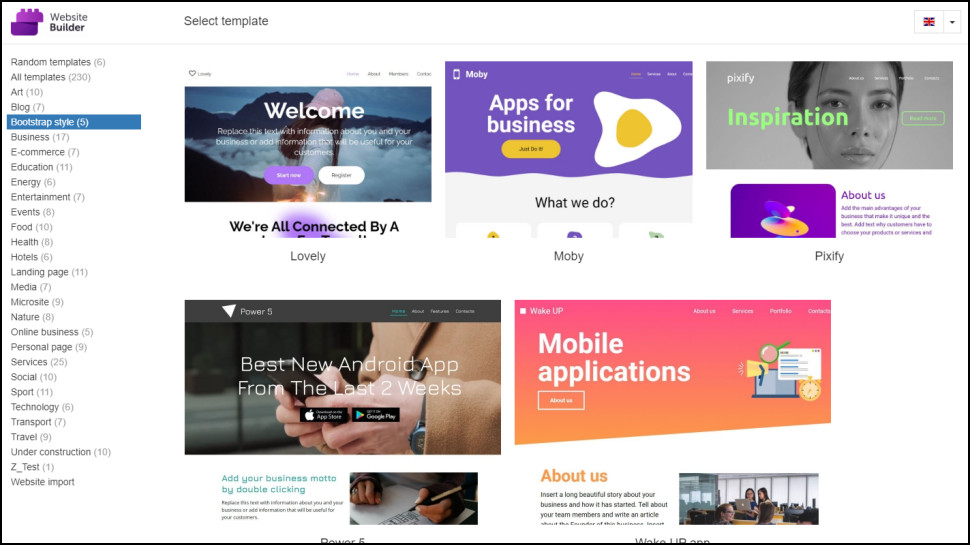
Does Namecheap have a website builder?
If you don't have a website yet, and WordPress looks too complicated, a website builder could be the answer. Choose a starting design from a site gallery, then add content to a page by dragging and dropping text, images, maps, contact forms and more.
Namecheap includes a free website builder with its shared hosting packages. This has 230 templates of various types (business, blogs, food, more), and a decent selection of widgets allows you to add plenty of content to your site: image galleries, maps, forms, blogs, product listings, payment buttons, and more. It's not a bad product, especially for free, and it provides an easy alternative to WordPress for simple site creation.
Namecheap also has a paid website builder called Site Maker, which is part of the Visual suite of design tools. Answer a few questions, upload an image or two, choose a color scheme, and Visual automatically creates your site. You can then replace the default text with your own and add pre-built blocks to insert new content, such as forms and photo galleries.
Namecheap doesn't stop with the website. Bonus free tools allow you to create a logo, design business cards, and more.
This isn't the most powerful of website builders (there's no web store support, for instance), but it's enough for simple personal sites, and the price is right. Visual is $3.88 billed monthly, with a free SSL certificate, 99.99% uptime, and support for creating a single site. There's a free .contact, .design, or .xyz domain, too, though beware, .com, .net, and other top-level domains must be purchased separately.
Can I build a web store with Namecheap?
Namecheap doesn't have any specialist ecommerce products, at least yet (we suspect the new Visual website builder will add something soon), but you're free to build a web store using any of the company's shared, dedicated or VPS hosting plans.
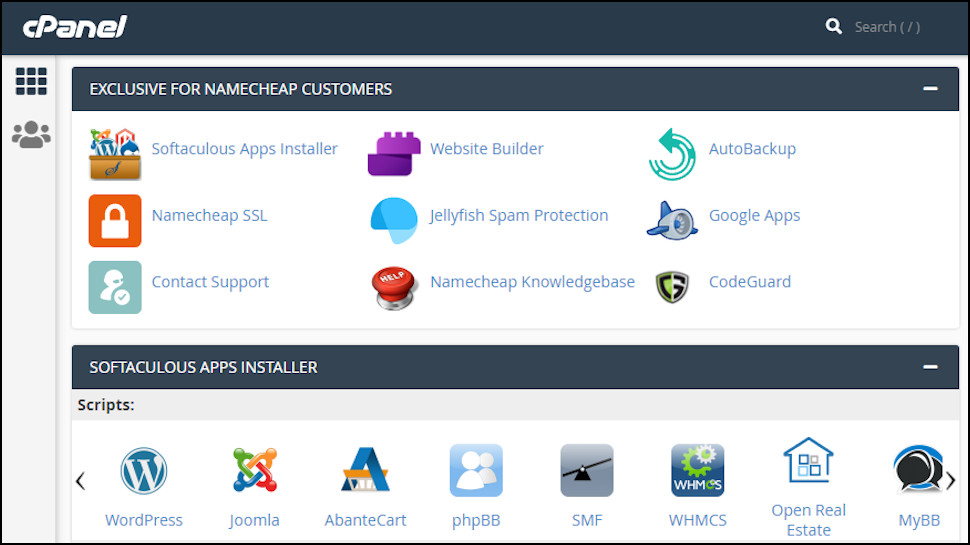
Sign up for shared hosting, for instance, and you'll get a copy of Softaculous. It's a capable platform which can help you install OpenCart, PrestaShop, WooCommerce or other ecommerce systems. Namecheap doesn't give you any special tools or store-building support to point you in the right direction, so you'll have to learn the basics yourself, but it's not too difficult (if you know your way around WordPress, you can learn WooCommerce.)
If you're looking for something simpler, try HostGator's website builder, which has the option to add a web store. Bluehost's WooCommerce plans are a good mid-range alternative that add a bunch of useful business-friendly marketing extras, and Wix offers great templates, a wealth of features, and the power to build almost anything.
How fast is Namecheap?
To test Namecheap shared hosting performance, we uploaded a pre-created WordPress website, then ran core benchmark and load tests. This enables us to see a snapshot of how the server should perform for WordPress websites and how it can cope with increasing user loads.
Reliability is also a factor in a hosting provider's performance, so, as a side note, Namecheap offers a 100% uptime guarantee for many of its hosting plans. That includes much of its shared hosting range, VPS, and Dedicated server accounts.
|
CPU & Memory |
Operations with large text data |
4.91 |
|
Random binary data operations |
5.28 |
|
|
Recursive mathematical calculations |
3.61 |
|
|
Iterative mathematical calculations |
6.84 |
|
|
Filesystem |
Filesystem write ability |
3.6 |
|
Local file copy and access speed |
4.85 |
|
|
Small file IO test |
8.59 |
|
|
Database |
Importing large amount of data to database |
3.88 |
|
Simple queries on single table |
7.38 |
|
|
Complex database queries on multiple tables |
1.31 |
|
|
Object Cache |
Persistent object cache enabled |
0 |
|
Network |
Network download speed test |
8.25 |
|
Overall |
Your server score |
4.7 |
Unfortunately, Namecheap's shared hosting didn't do quite as well as we would have liked. The overall score is 4.7, which wasn't dragged down by any particular WordPress key performance segment, but showed overall weakness across the board.
There are several other hosts in the best cheap web hosting space to have this lacklustre performance in shared hosting. It's only unfortunate that some cheap yet high-performance solutions also exist, such as Hostinger, which scored an impressive 8.1 for its WordPress core benchmark test.
|
Concurrent users |
5 |
9 |
15 |
|
Transactions |
1677 |
2903 |
4917 |
|
Availability |
100 |
100 |
100 |
|
Elapsed time |
299.15 |
299.02 |
299.78 |
|
Data transactions |
72.19 |
129.47 |
216.13 |
|
Response time |
0.89 |
0.92 |
0.91 |
|
Transaction rate |
5.61 |
9.71 |
16.4 |
|
Throughput |
0.24 |
0.43 |
0.72 |
|
Concurrency |
4.99 |
8.97 |
14.97 |
|
Successful transactions |
1677 |
2903 |
4917 |
|
Failed transactions |
0 |
0 |
0 |
|
Longest transaction |
7.25 |
7.16 |
8.95 |
|
Shortest transaction |
0.63 |
0.63 |
0.63 |
Given the not-so-great results in core WordPress benchmarks, we weren't too hopeful about Namecheap's load test. This is where we were proven wrong, and Namecheap pulled a whopper on us.
As user loads increased, Namecheap's shared hosting server maintained a 100% successful transaction rate and a reasonably low longest transaction time of 8.95 seconds. While the overall transaction volume was middling, it does mean that Namecheap's servers are highly reliable under load.
Based on these results alone, we can definitely recommend them if you're in the market for a reasonably priced host that can run a steady WordPress website.
How easy is Namecheap to use?
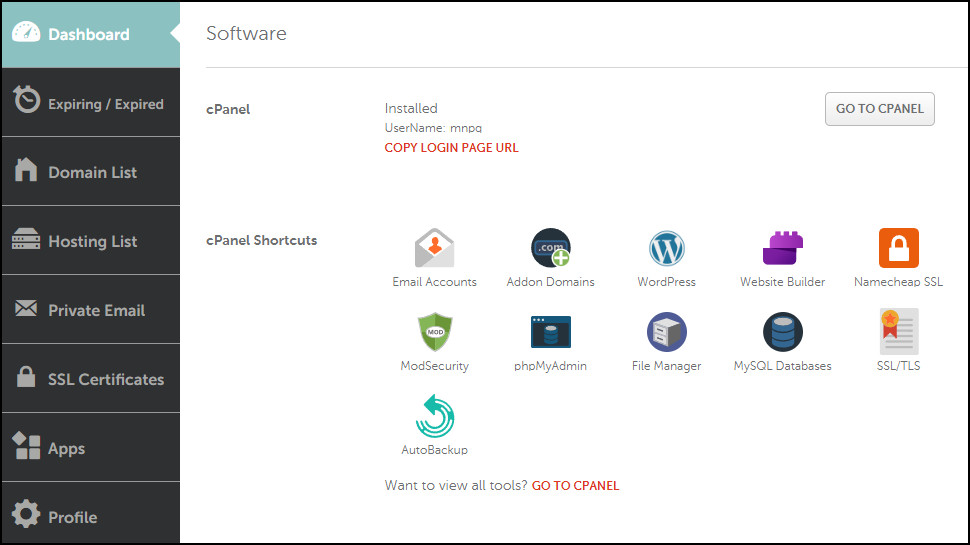
Namecheap's account control panel looks a little cluttered at first glance, with lists, and sidebars, and menus and icons everywhere you look. But spend just a moment exploring, and it begins to make a lot more sense.
There's a list of your domains over here, for instance, hosting panels over there, and some of these pages are hugely useful. Visit your hosting plan's Manage panel, for instance, and you'll find its disk space and bandwidth allowance; server hostname, IP address and data center; cPanel Launch button and shortcuts; usage stats, auto-renewal settings, a Cancel button and more.
That's a huge improvement on many providers, where key settings and options are scattered around, and you can spend an age trying to find the features and details you need.
You'll probably spend more time managing your website rather than your hosting plan, of course, but Namecheap scores here, too. While IONOS, iPage and some other hosts try to cut corners by providing their own custom management tools, Namecheap uses industry standards such as Softaculous to install and manage WordPress, and cPanel to set up your domains, emails and just about everything else.
This is good news, for a couple of reasons. First, it's a guarantee of quality (that's how these tools got to be industry standards.) But mostly, it makes life easier for everyone. If you've ever used cPanel or Softaculous before, you'll feel at home here immediately. And even if you haven't, the time you spend learning the cPanel basics won't be wasted. If you move from Namecheap in a few years, there's a good chance your next provider will also use cPanel, and you'll already know how to do all your most important hosting tasks.
What is Namecheap's support like?
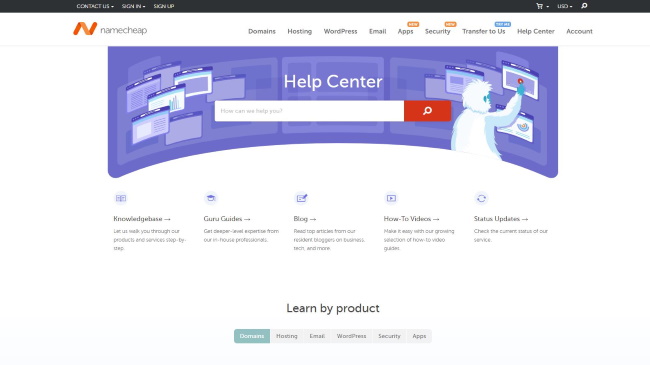
Namecheap has 24/7 support via its website, live chat and ticket (there's no telephone support).
The web knowledgebase is a vast collection of articles organized into common hosting categories: email, SSL certificates, domains, EasyWP (Namecheap's WordPress range), and more.
Choosing a section like WordPress displays articles in subsections: Getting Started (Dashboard Overview, How to create a website etc.), WordPress migration, plugins and themes (How to install a new theme), database access, domains and more.
It's both hugely comprehensive, and also surprisingly easy to use. Just scrolling down the WordPress category page reveals articles that many users will want to read: 'What's the different between managed WordPress hosting and shared hosting?', 'How to access your WordPress dashboard?', 'How to improve WordPress website security', and many more. This isn't just a place for troubleshooting specific issues; it's somewhere we might happily visit just to learn about a product.
Sometimes you need to solve an immediate problem, of course, and that's where live chat comes in. This worked well for us: chat was always available, the longest we waited for a conversation to begin was around three minutes, and the agents did a good job of identifying our issues, and clearly explaining what to do next.
Our test ticket left us waiting for a little longer, but we still had a reply in around 90 minutes. It was helpful, summarizing everything we needed to know in a single paragraph, and providing a link if we needed to know more.
The lack of any phone option might be an issue for some, but overall Namecheap's support worked well for us, especially considering the (very low) prices you're paying. If this is a key priority for you, check out the support site for yourself; you don't have to be a customer to view it, and just browsing the categories and articles will give you a good idea of how the service could work for you.
Final verdict
Namecheap’s hosting doesn’t quite have the power or features you’ll see with the best of the competition. Still, it could be a wise value choice for first-timers with relatively basic sites, or businesses that can make good use of its more powerful dedicated hosting range.
While the plans we tested didn't offer blazing-fast speeds, we did note that they're steady workhorses that can pull along just fine even at somewhat heavy loads. Combined with their "all-in" services, Namecheap is as good as it gets if you want decent hosting and everything else in one service provider.
Namecheap web hosting FAQs
What payment types does Namecheap support?
Namecheap accepts payments via card, PayPal and Bitcoin.

Does Namecheap offer refunds?
Namecheap's refund policy is far more complicated than most providers, with all kinds of special clauses and exceptions. Scala Hosting describes its money-back guarantee in under 140 words; Hostwinds, under 180; Namecheap needs more than 1,500.
If we summarize that, as a general rule, Namecheap offers a 30-day money-back guarantee for most shared and VPS hosting packages, and 7 days for dedicated hosting. Add-on products and services mostly aren't covered, with a few exceptions (some domain name renewals are refundable if you make a request within five days of purchase, for instance).
Although we'd prefer a policy that's a little simpler to follow, Namecheap's 30 day refund period is standard for the industry. If you need more, HostGator offers 45 days, InMotion Hosting an exceptional 90 days on many plans.
Does Namecheap have an uptime guarantee?
Namecheap has a 99.9% uptime guarantee for its VPS and reseller accounts, and, unusually, a 100% uptime guarantee for its other shared and dedicated hosting plans.
For every hour of unscheduled maintenance or downtime you experience in a month, Namecheap will offer you a day for free, up to a maximum of one month's free hosting.
This isn't quite as good as it sounds. Other providers typically have a 99.9% uptime guarantee, which translates to an acceptable downtime of 43.83 minutes a month. Although Namecheap specifies a 100% uptime guarantee, it won't begin to pay out until your site has been down for a total of one hour: the company is allowing itself more downtime, not less.
Despite that, Namecheap's deal is still better than we see with many providers. GoDaddy has a 99.9% uptime guarantee, for instance, but if it doesn't meet that, you can only receive a maximum 5% credit for your monthly fee.
Where are Namecheap's data centers?
Web hosts run and maintain their servers in buildings called data centers. A good web host should have plenty of web hosts around the world, and allow you to choose which one will host your site. If your audience is in California, say, selecting a US data center will get you much better performance than something in Australia.
Namecheap has data centers in the USA, UK and Netherlands. There's a catch in an unusual extra $1 a month for choosing the UK or Netherlands locations for some plans (look carefully in the shopping cart when you pick a data center, to be sure you're not caught out.) But if you can live with the price, that should deliver good results for both North American and European customers.
Namecheap's locations aren't much help if you're in Asia, though, and some providers have a more global reach. For example, GoDaddy has data centers in North America, India, Singapore and Europe.
What is my Namecheap IP address?
It's sometimes useful to know the IP address of the server hosting your website. For example, this can help you point a domain you've registered elsewhere to point at your Namecheap web space. Whatever the reason you need the IP, it only takes a moment to locate. Here's what to do.
Log into your Namecheap control panel (ap.www.namecheap.com).
Click 'Hosting List' in the left-hand sidebar.
Find your plan in the Hosting Subscription list, and click its 'GO TO CPANEL' button on the right-hand side.
Look at the General Information box on the right-hand side. Your server IP is listed as the 'Shared IP Address'.
(If you don't see a General Information, find and click the Server Information link).
What are Namecheap's nameservers?
If you have a Namecheap shared hosting package (Stellar, Stellar Plus or Stellar Business), you must use the nameservers dns1.namecheaphosting.com and dns2.namecheaphosting.com.
With other plans, check Namecheap's 'How to connect a domain to a server or hosting’ support document for more information.
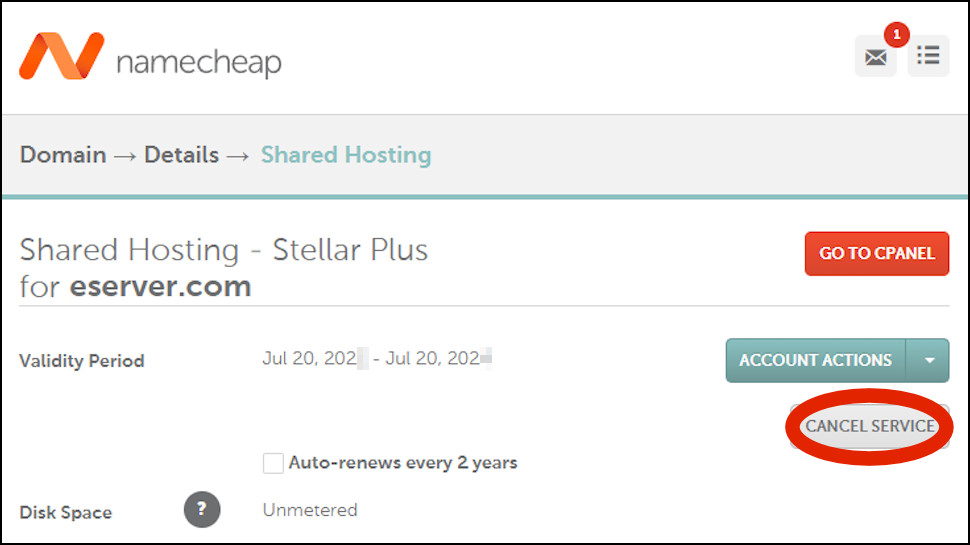
How do I cancel a Namecheap product?
Log into your Namecheap control panel (ap.www.namecheap.com).
Click 'Hosting List' on the left-hand side.
If you'd like a plan to expire when its subscription ends, click Auto-Renew to turn it off.
To cancel a plan right now, click the arrow to the right of the 'GO TO CPANEL' link and click Manage.
Click Cancel Service to open the cancellation page and complete its various steps. Be sure to read everything carefully, because there are important details here. You may be told if you can (or can't) get a refund, for instance, and if there's anything else you need to do to cancel the account.
Where can I find my Namecheap support PIN?
Contact Namecheap support with any account-related question and the agent will ask for a support PIN, a secret number which verifies that you're the real account owner.
If you can't remember your PIN, log into the Namecheap account panel (ap.www.namecheap.com), then hover your mouse over (or just click) your account name top-left of the screen. The Security page appears, and your support PIN is listed on the left, in the Access section.
Alternatively, to access the Security page directly, click Profile, Security in the left-hand sidebar.


Comments
Post a Comment